Robot vacuum cleaners ownership guide: bags, brushes, batteries and floor preparation
A robot vacuum saves time only when floors, mapping, consumables and maintenance suit the home. The useful question is whether its cleaning system remains predictable and supportable.
In this guide
Treat the robot as a small cleaning system
Navigation quality cannot compensate for tangled brushes, a blocked filter, an unsuitable dock or floors that are never prepared. Set a repeatable floor routine, inspect wear parts by evidence and price replacement consumables before the original set is exhausted.
Start with the robot-vacuum home-readiness audit, compare lasting value in the robot-vacuum value guide, and use our cordless-versus-robot comparison when the cleaning job is still unclear.
| Ownership issue | Evidence to check | Practical response | Avoid |
|---|---|---|---|
| Hair on the brush | Brush ends, bearings and cleaning result | Remove safely at a regular interval | Cutting near bristles or wiring |
| Weak pickup | Bin, filter, airway, brush and floor type | Clean one stage and retest | Assuming the battery is always responsible |
| Docking failures | Dock clearance, cable, light and map | Restore the documented dock position | Moving the dock without remapping |
| Shorter runtime | Area, mode, temperature and charge history | Compare matched runs before replacing | Buying an unverified battery |
Keep this ownership record
- Model and serial number.
- Dock and map configuration.
- Brush and filter part codes.
- Bag or bin capacity.
- Cleaning and replacement dates.
- Matched runtime observations.
- Firmware and app changes.
- Battery and repair quotations.
Prepare the floor before every automated run
Lift charging cables, drawstrings, lightweight mats, small toys and fragile objects that can enter the brush or block a wheel. Close access to stairs or unsafe zones unless the model has a verified physical or digital boundary.
A five-minute preparation routine can be more valuable than an elaborate schedule. Record recurring obstacles and change storage or cable routing so the same failure does not consume attention every day.
Keep the dock location stable
Follow the maker’s clearance, power and floor guidance and place the dock where the robot can approach without a narrow turn. Keep its charging contacts and the robot contacts dry and free of loose debris.
If the dock must move, check whether the map should be recreated. Repeated docking failures can result from glare, shifting furniture, weak contact, a damaged cable or an unsuitable location rather than a failed robot.
Use maps as a household tool, not a perfect plan
Name rooms and no-go areas only after the robot has produced a stable map. Check changes after furniture moves, software updates or unusual obstructions before trusting a scheduled run in an unattended home.
Mapping data can reveal the shape and use of a home. Review account security and privacy choices with the home-device privacy guide, especially when cameras or remote viewing are involved.
Empty the bin before airflow becomes the problem
A small bin can fill long before a whole-home run ends, particularly with pet hair or a first deep clean. Inspect the fill pattern and empty according to the exact manual without forcing dust into seals or sensors.
A self-empty dock changes the task rather than removing it. Bags, channels, seals and the dock bin still need inspection, and proprietary bags should be included in the annual ownership cost.
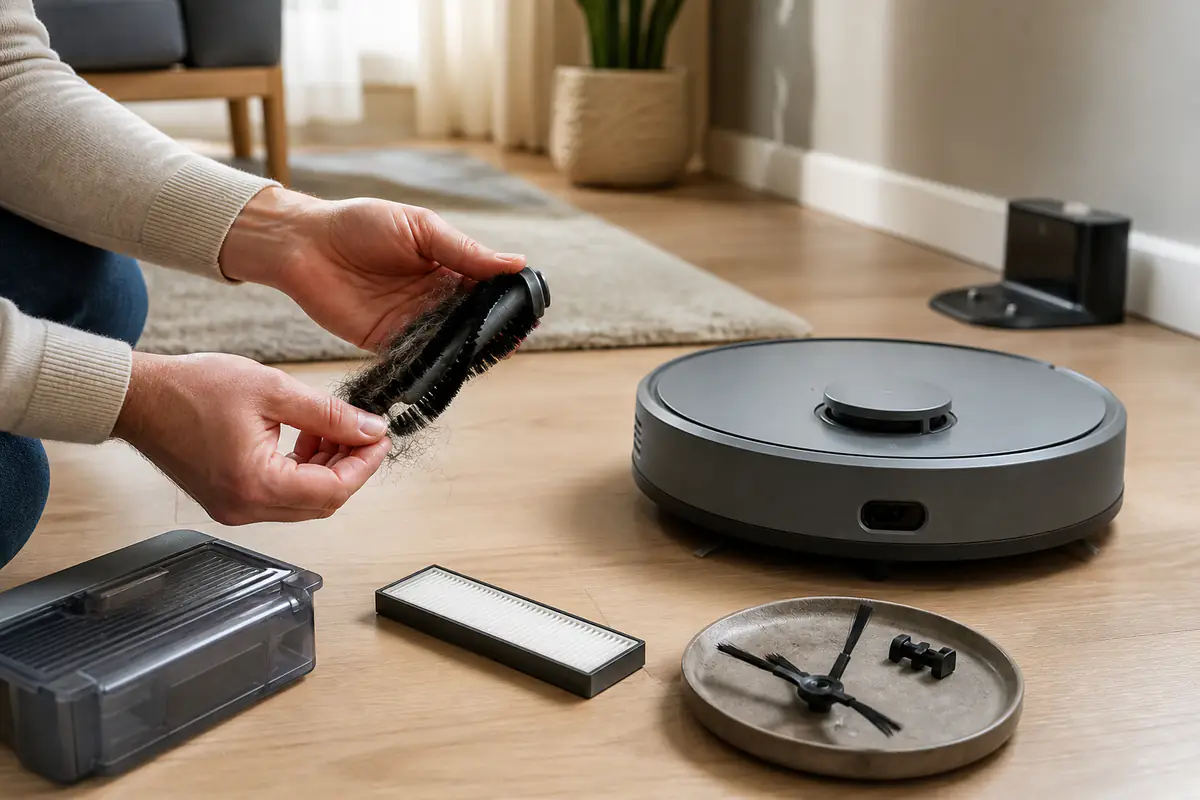
Clean the main brush without damaging it
Remove the brush only by the documented method. Clear threads and hair from the centre, ends and bearing areas with the supplied or suitable tool, then check that the brush turns freely and seats correctly.
Do not use a blade close to rubber, bristles, wiring or your hand. A brush that is deformed, cracked or worn beyond the maker’s limit should be replaced with a compatible identified part.
Inspect side brushes as directional wear parts
Side brushes bend and abrade because they contact edges and furniture. Compare their shape, fixing and rotation with the manual and with earlier photographs rather than replacing them only because a fixed calendar date arrives.
A bent arm may sometimes recover under the maker’s approved method, but heat or improvised reshaping can damage the material. Replace a loose or split brush before it scatters debris or detaches.
Treat filters as part of suction and air quality
Follow the exact instruction on whether a filter may be washed. A washable-looking filter may contain material or construction that is damaged by water, while a washed filter must be completely dry before refitting.
Record cleaning and replacement dates and compare pickup after a correct service. Use the vacuum specification guide to separate airflow, filtration and marketing language.
Clean sensors with the specified dry method
Cliff, wall, wheel and navigation sensors can misread when covered by dust or streaks. Use only the cloth and method recommended for the model and avoid cleaner entering openings.
A navigation error after cleaning may reflect a moved dock, changed light, dark surface, mirror, threshold or corrupted map. Change one condition at a time before declaring a sensor fault.
Monitor wheels and thresholds
Remove visible debris from caster and drive-wheel areas without dismantling parts the manual treats as non-user-serviceable. Check whether the wheel moves and returns normally and whether a threshold has become loose or higher.
For repeated trapping, use a verified no-go area or physical change rather than forcing the robot over an unsuitable transition. The UK robot-vacuum buying guide explains why real floor geometry matters.
Compare battery performance on matched runs
Record floor area, mode, brush state, temperature, route and time before drawing conclusions from runtime. A blocked system or a new high-power setting can shorten a run without indicating battery failure.
When replacement is justified, verify model, voltage, capacity, connector, safety information, seller and warranty. Stop using a swollen, leaking, unusually hot or damaged battery and follow official disposal guidance.
Price consumables before stock becomes urgent
Keep exact part codes for brushes, filters, bags, mop pads and cleaning solution where applicable. Compare authorised availability, pack quantity and replacement guidance rather than buying a large anonymous bundle.
A cheap consumable that fits poorly can leak dust, obstruct airflow or damage a dock. Include delivery and realistic replacement frequency when assessing the robot through total cost of ownership.
Use only approved liquids and mop routines
Check whether the tank permits water, a specific solution or no additive. Keep liquid away from charging equipment and remove or dry mop components as directed after use.
Mopping pads should be washed and dried before odour or residue accumulates. Do not add fragrance, disinfectant or detergent unless the manufacturer explicitly permits the exact use.
Manage updates and account security
Review release notes where available, keep the app and device supported and use a unique account password with stronger sign-in protection when offered. Recheck maps, schedules and privacy settings after significant updates.
A robot that loses software support may still clean locally, but remote features and security become an ownership trade-off. Record the support position before paying for a repair or replacement.
Decide between repair and replacement with evidence
Separate a replaceable brush, wheel, battery, dock or sensor from a main-board or structural failure. Ask for fault evidence, parts availability, labour, warranty and expected remaining service life.
Use the repairability and spare-parts guide and compare a repair quotation with a suitable replacement, not with the most expensive current model.
Store and retire the robot safely
For a long pause, follow battery charge and storage instructions, empty dust and water, dry washable parts and protect the dock and cables. Do not leave a damp pad attached.
Before resale or recycling, remove the device from the account, erase maps and personal data using the official route and retain evidence of the reset. Browse Home & Kitchen for related ownership planning.
What should happen when cleaning performance falls?
The fault follows dirt, wear or setup
Bin, airflow, brush, filter, sensors, dock and map can be checked safely in a controlled order.
Safety or supported parts are the limit
Battery damage, electrical faults, structural failure or unavailable support makes continued experiments inappropriate.
Balanced verdict
Robot-vacuum value depends on a maintainable routine. Prepare floors, service the airflow and brush path, secure mapping data and measure battery performance before buying parts.
The right robot is the one whose consumables, support and daily preparation remain proportionate to the cleaning saved.
Official checks:
GOV.UK product safety advice ↗
GOV.UK waste battery guidance ↗
ICO online privacy guidance ↗
GOV.UK recycling collections ↗
Frequently asked questions
How often should a robot vacuum brush be cleaned?
Inspect it according to the manual and household use; pet hair and threads may require much more frequent attention than a fixed generic schedule.
Can every robot-vacuum filter be washed?
No — Wash only when the exact manufacturer instructions permit it, and refit only when completely dry.
Why does a robot suddenly fail to dock?
Check dock position, clearance, power, contacts, light, obstacles and map changes before assuming a component has failed.
When should the battery be replaced?
Compare matched runs and replace only with a verified compatible part when measured performance or a diagnosed fault justifies it.
Should maps be erased before selling the robot?
Yes — Remove account access and maps through the official reset and unpairing process before transfer or recycling.
Methodology and limitations
We assessed robot-vacuum ownership through floor preparation, docking, mapping, bins, brushes, filters, sensors, wheels, batteries, consumables, mopping, software, privacy, repair and retirement. The assessment separates safe user maintenance from work that needs the manufacturer or a qualified repairer, and treats compatible parts, account security and disposal as ownership costs rather than afterthoughts. We compared each decision against a documented baseline so a changed route, obstructed airflow or new setting is not mistaken for hardware failure. We did not conduct hands-on testing of individual models, rank brands or assume that one maintenance interval fits every floor plan, pet household or cleaning frequency.
Limitations
Designs, consumables, battery systems, app features and safety instructions vary by model. Follow the exact current manual and seek qualified help for electrical, battery or structural faults.