Robot vacuum value guide: navigation, cleaning fit, parts and running cost
A robot vacuum creates value by doing suitable maintenance cleaning reliably. Map the home, define the debris and count docks, bags, brushes, filters, privacy and manual work before comparing headline suction or automation.
In this guide
Buy for the floor plan and maintenance routine, not an automation demo
The best-value robot is the simplest model that can navigate the real home and remain serviceable. Measure clearances, map thresholds and cables, check replacement-part access and price the full cleaning system over several years.
Start with the robot-vacuum home-readiness audit, compare formats in cordless versus robot vacuum, and use the cordless vacuum value guide for the manual part of the system.
| Decision | Evidence to collect | Useful threshold | Hidden cost |
|---|---|---|---|
| Navigation | Room shape, obstacles, maps and no-go tools | Completes repeatable routes | Daily rescue and remapping |
| Cleaning | Debris, carpet, edges and hair | Maintains target zones | Separate deep cleaning |
| Dock | Footprint, emptying and mop handling | Fits a ventilated power position | Bags, solution and cleaning |
| Ownership | Brushes, filters, battery and support | Parts available at known cost | Obsolescence or app loss |
Robot vacuum evidence pack
- Draw every intended cleaning zone.
- Measure thresholds and furniture clearance.
- List cables, rugs, tassels and pet bowls.
- Define debris and carpet depth.
- Check dock footprint and mains access.
- Price filters, brushes and bags.
- Read privacy and account requirements.
- Keep a manual-cleaning fallback.
Decide what “clean enough” means
A robot normally provides frequent maintenance rather than a complete replacement for stairs, upholstery, skirting edges, spills or deep carpet cleaning. Define the rooms, debris and frequency it must handle and the tasks that will remain manual.
Value improves when the device prevents dirt building up between thorough cleans. It falls when preparation, rescue and post-run maintenance take longer than a small conventional clean.
Map the home before choosing navigation
Draw connected floor area, closed doors, narrow passages, dark surfaces, mirrors, direct sun, steps and furniture gaps. Note whether the robot must work on one level, be carried between floors or store several maps.
LiDAR, camera and simpler sensor systems each have trade-offs. Do not rank them by acronym alone; look for evidence that the chosen system handles the actual lighting, obstacles and privacy expectations.
Measure thresholds and low furniture
Measure the highest transition strip and the lowest furniture the robot is expected to enter. A few millimetres can decide whether a room is reached or whether the device wedges repeatedly under a cabinet.
Include the raised sensor housing, not just body height. If the route requires frequent manual lifting or blocking, count that as ongoing labour rather than a one-off setup.
Audit cables, tassels and small objects
Loose charging cables, rug tassels, shoelaces, lightweight mats, toys and pet bowls can stop a run or become damaged. Decide whether the household can reset these consistently before scheduled cleaning.
Obstacle recognition can reduce risk but is not permission to leave hazardous objects in the path. A tidy route is the most reliable compatibility feature and costs less than paying for an unproven promise of object avoidance.
Match pickup to debris and floor
List hard floor dust, crumbs, pet hair, litter, cereal and carpet fibre separately. Brush design, airflow, intake width and surface contact affect results together, so a single suction figure cannot predict cleaning.
For mixed floors, check carpet detection and whether the robot can lift or avoid a wet pad. Deep-pile rugs and long fringes may remain manual zones even when hard-floor performance is strong.
Treat mopping as controlled wiping
A small water tank and pad can manage light film on compatible sealed floors, but do not assume stain removal, hot-water washing or hygienic separation. Check flow control, pad lifting and detergent restrictions.
Do not wet-clean unsealed wood or sensitive flooring without manufacturer approval. Count pad washing, drying and dock-tank cleaning as part of the routine.
Choose dock complexity deliberately
A charging dock needs less space and fewer consumables. Self-emptying, water-refill and pad-washing docks can reduce daily handling but add footprint, noise, bags, tanks, plumbing-like cleaning and more failure points.
Measure the dock with lids and tanks open, allow ventilation and place it on a stable level surface. Automation that cannot be serviced comfortably in its location is not useful automation.
Price consumables over several years
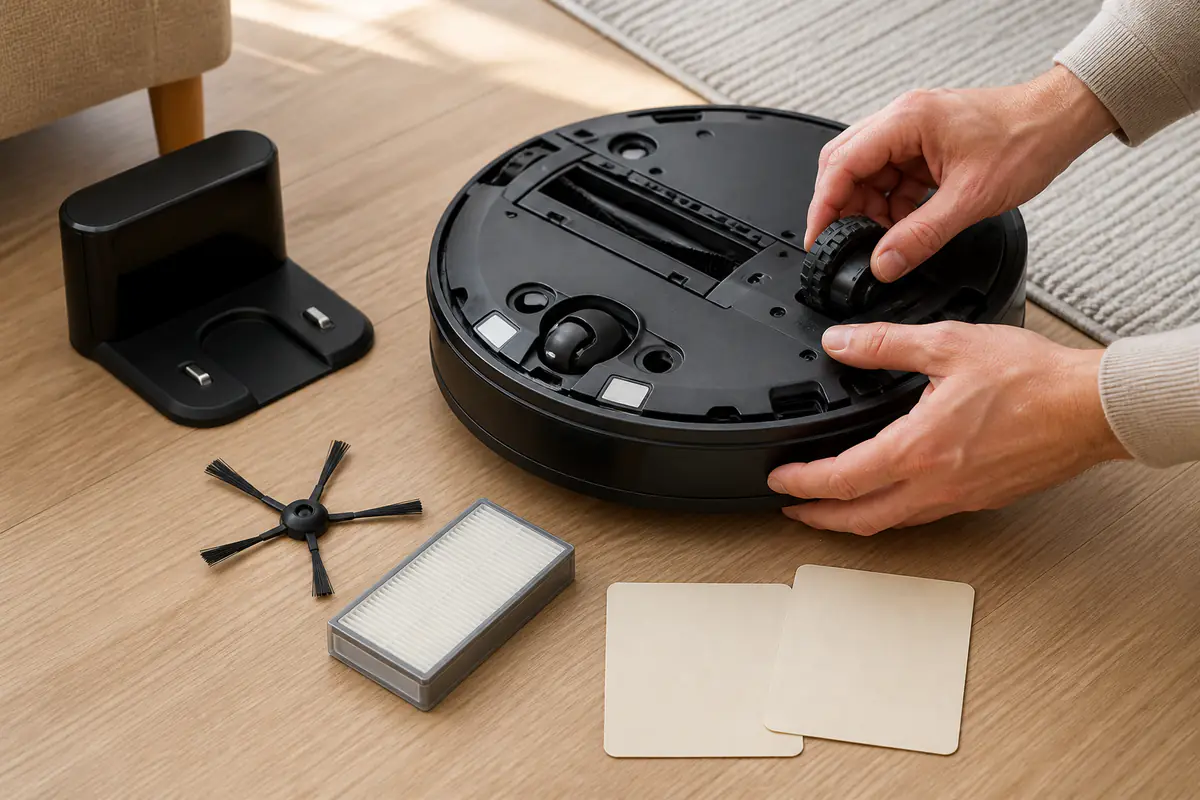
List side brushes, main brush, filter, dust bags, mop pads, cleaning solution and battery. Use realistic replacement intervals from the manufacturer and household debris rather than assuming every schedule is mandatory or optional.
Apply total cost of ownership to purchase price, consumables and likely replacement. A cheaper robot with scarce proprietary parts can cost more than a plain model with supported components.
Check hair handling and cleaning access
Long hair can wind around axles, brush ends and caster wheels even when a product is marketed as anti-tangle. Look for removable end caps, accessible channels and a safe cutting tool.
The underside should be easy to inspect without damaging sensors. If routine cleaning needs awkward screws or force, maintenance will be skipped and performance will decline.
Evaluate maps, apps and offline function
Record which features require a phone, account, cloud service, precise location permission or home Wi-Fi. Check whether basic start, stop and return-to-dock controls remain available on the device.
Maps can be useful but may reveal room layout and routines. Read the manufacturer privacy notice, retention and account-deletion route; do not assume local navigation means all data stays local.
Check repairability and battery route
Find official or authorised availability for brushes, filters, wheels, dock parts and battery. Ask whether the battery is replaceable with ordinary service and whether support continues after a model generation changes.
Use the appliance repairability guide to separate a replaceable wear item from a sealed product. A serviceable battery can materially extend useful life.
Plan energy and standby use sensibly
Robots charge intermittently and docks remain connected. Compare published consumption where available, but do not overstate small energy differences without considering cleaning frequency and self-emptying or drying functions.
Use the energy-efficient appliance framework to measure the whole routine. Repeated failed runs can waste more energy and time than a slightly higher-rated successful route.
Use a staged setup test
Begin with one prepared room under observation, inspect what the robot missed or disturbed, then add zones gradually. Set no-go areas for cables, fireplaces, water and delicate floor transitions.
Do not infer whole-home reliability from one empty demonstration. Test typical chairs, evening light, closed doors and the debris pattern that actually occurs.
Keep hygiene and fault evidence
Empty bins and clean filters according to instructions, allow wet components to dry, and keep pet waste out of the route. Stop the machine if it develops unusual noise, heat, smell or wheel resistance.
Record model, serial, app version, error and conditions before seeking support. A concise fault record is more useful than repeated resets that erase evidence.
Choose the least complicated adequate system
A basic robot plus a good manual vacuum may outperform a premium all-in-one machine in a difficult multi-level home. Browse Home & Kitchen for complementary cleaning checks.
Buy the feature only when it removes a measured task. Navigation reliability, accessible maintenance and supported parts normally create more value than a long list of occasional app functions.
Record the first month of real workload
Log successful runs, rescues, preparation minutes, missed zones, bin emptying and brush cleaning for several ordinary weeks. This shows whether the machine is reducing work or merely moving it into setup and maintenance.
Keep the record concise and do not manufacture extra runs to justify the purchase. If the home changes, update no-go zones and furniture clearance before blaming hardware for a route that no longer matches the map.
Plan for pets, children and changing routines
Schedule runs only when floors can be checked for toys, bowls, cables and pet accidents. Door gates and moved furniture can change the safe map, so do not rely blindly on yesterday’s route.
Household automation should remain easy to pause. Make sure every regular user knows the physical stop control, dock location and what to do when the robot collects an unsafe object.
Which robot-vacuum setup offers better value?
The route is clear and maintenance is manageable
Hard floors, predictable clutter and a manual fallback make regular autonomous pickup realistic.
The home defeats reliable automation
Thresholds, stairs, cables, deep rugs or privacy requirements would create constant rescue and preparation.
Balanced verdict
Robot-vacuum value is a workflow result, not a suction or feature ranking. Map the home, price parts and choose the simplest machine that completes repeatable useful runs.
Keep manual tools for stairs, edges, upholstery and the deeper cleaning a robot cannot credibly replace.
Official checks:
GOV.UK product safety advice ↗
ICO guidance on smart devices ↗
Recycle Your Electricals guidance ↗
GOV.UK consumer protection rights ↗
Frequently asked questions
Can a robot vacuum replace a cordless vacuum?
Usually not completely. Stairs, upholstery, edges, spills and deep cleaning still need a suitable manual tool.
Is a self-emptying dock worth it?
It can reduce bin handling, but only when the extra footprint, noise, bags and dock cleaning solve a real household problem.
Does higher suction guarantee better cleaning?
No — Brush contact, airflow, navigation, debris type and floor surface work together.
Do robot vacuums need internet access?
Many advanced map and schedule features require an app or account. Check what basic functions remain available offline.
What parts should be priced before purchase?
Check filters, main and side brushes, bags, mop pads, battery and any dock-specific consumables.
Methodology and limitations
We assessed robot-vacuum value through floor-plan compatibility, navigation, debris pickup, dock workload, consumables, privacy, repairability and the continuing manual-cleaning requirement. We did not rank untested models or repeat manufacturer laboratory claims.
Limitations
Homes, floor coverings, pets, firmware, app services, consumable prices and parts support vary. Verify the exact model dimensions, safety instructions, privacy terms and UK parts route before purchase.