Wireless earbuds ownership guide: replacement tips, cleaning, batteries and case longevity
Keep the exact model record, remove tips only as instructed, clean mesh and charging contacts with the approved dry method and treat water resistance as a limited design claim. Uneven sound, heat, swelling or unstable charging needs evidence before more cleaning.
In this guide
Clean the removable interface; do not push debris into the earbud
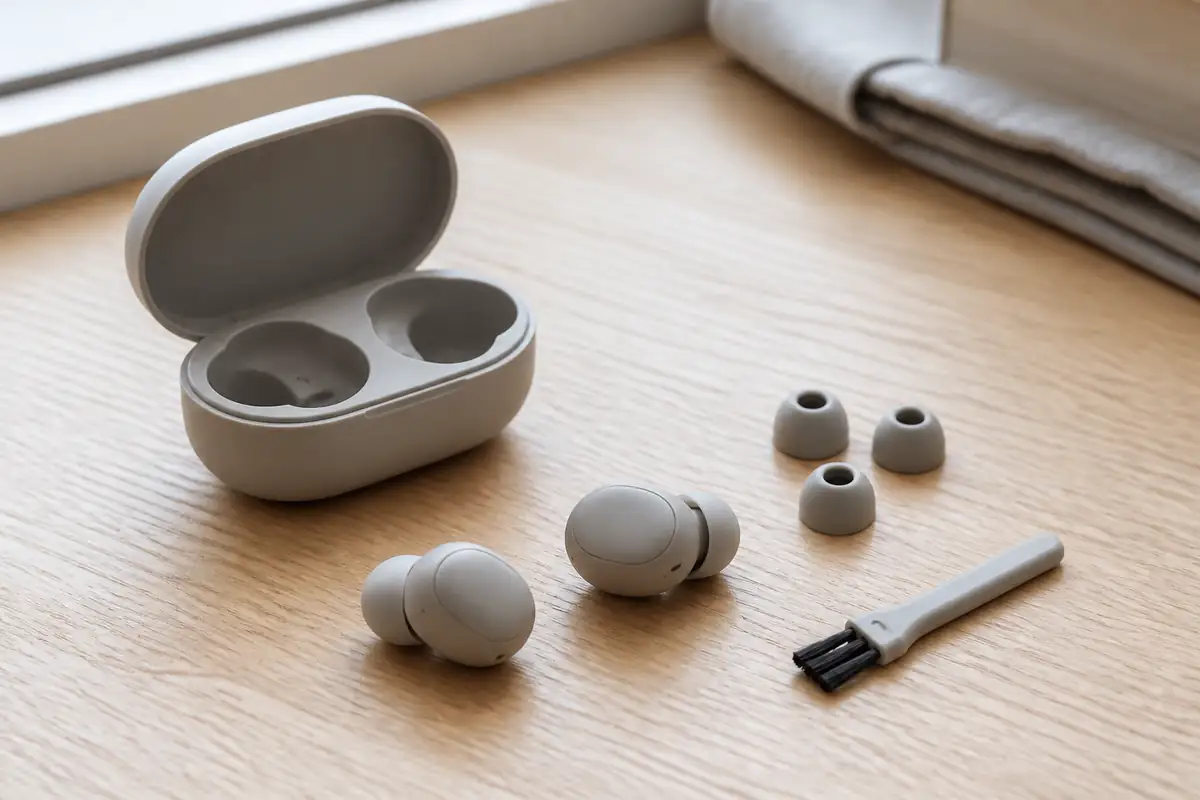
Inspect tips, mesh, vents, contacts and case wells in good light, then follow the exact maker’s tools and fluid restrictions. Replace worn tips with documented compatible parts. Stop using an earbud or case that swells, cracks, overheats, smells, smokes or has suffered serious liquid or impact damage.
For selection, codecs and fit before purchase, start with our wireless-earbuds buying guide and headphone specifications guide. This article begins after purchase and cannot replace model-specific instructions or medical advice.
| Symptom | First category to check | Do not |
|---|---|---|
| Quieter on one side | Fit, tip, mesh, balance setting and source | Puncture or soak the mesh |
| Case will not charge | Cable, charger, port, contacts and temperature | Scrape contacts with metal |
| Shorter runtime | Volume, features, signal, temperature and age | Run repeated deep-discharge stress tests |
| Loose fit | Tip size, condition and documented alternatives | Use an unverified part that blocks a vent |
| After water exposure | Exact resistance claim and maker response | Charge while damp or dry with heat |
Keep model and pairing records
Photograph the case label, serial information and each earbud before wear makes markings difficult. Save proof of purchase, manual, app name, firmware notes and replacement-part list. Left, right and case components may have separate identifiers.
Record the devices paired and any accessibility balance settings. A phone upgrade or software reset can mimic hardware imbalance. Do not remove an old device record until you know the new pairing is stable.
Weekly condition check
- Inspect tips for tears, hardening and poor attachment.
- Check mesh and vents without inserting a tool.
- Look at charging contacts and case wells in bright light.
- Confirm the lid, hinge, cable and port are undamaged.
- Notice unusual heat, smell, sound or battery drain.
- Check fit before high-movement use.
- Let all cleaned parts dry fully before charging.
Remove and clean tips correctly
Silicone, foam and proprietary tips do not share one method. Follow the maker’s removal direction so the nozzle is not twisted or pulled from the body. Clean removable tips separately only with the permitted method, rinse only if allowed and dry completely before refitting.
Replace a tip that tears, stretches, hardens or detaches too easily. Match model, size and vent geometry. A third-party tip can change seal and sound, prevent case closure or remain in the ear. If a tip becomes lodged, seek appropriate medical help rather than probing.
Mesh and vents are delicate acoustic parts
Wax and dust can reduce output, but aggressive cleaning can push debris inward or damage acoustic mesh. Use the specified dry brush, wipe or tool at the stated angle. Do not use pins, compressed air, household solvent or an ultrasonic bath unless explicitly approved.
Compare left and right after cleaning with the same tip, track, source and balance setting at a safe volume. Persistent difference may be hardware, hearing or fit. Do not raise one channel excessively to overcome a blockage.
Clean charging contacts without abrasion
Disconnect the case and remove earbuds. Inspect contacts for dust, moisture and residue. Use only the maker-approved dry method. Metal tools can short, scratch or remove plating; wet cleaners can enter the battery enclosure.
If an earbud does not seat, check tip compatibility and visible obstruction before pressing harder. A swollen battery can also change fit in the well. Stop if the case or bud is deformed.
Battery ageing is gradual, damage is not
Runtime changes with volume, microphone use, noise control, codec, signal strength, calls, temperature and cell age. Compare under similar settings and record results over several ordinary cycles. One busy call day is not a battery diagnosis.
A sharp change, heat, swelling, smell or unstable charging is different. Stop use and follow manufacturer or product-safety advice. Do not open the shell or flatten a swollen cell.
Charge as a complete system
Use a compatible cable and charger within the case’s documented input. Higher charger wattage does not prove faster safe charging. Keep the case on a firm, dry, ventilated surface and away from bedding, direct sun and heat.
Our USB-C charger ownership guide covers cables, multi-port sharing and contact wear. If charging cycles on and off, isolate one known-compatible component at a time after checking for damage.
Water resistance has conditions
An IP claim applies under defined test conditions and may differ between earbuds and case. Resistance can decline with wear and damage. Sweat, soap, sea water and pool chemicals are not interchangeable with clean test water.
After exposure, follow the exact drying position and interval. Do not charge while damp, use a hairdryer, put parts in rice or test repeatedly. If the case has no matching resistance claim, wet earbuds can transfer moisture into it.
Software and resets
Before a reset, record custom controls, equalisation, device list and hearing or accessibility settings. Use the official sequence for the exact model. A reset can solve corrupted pairing; it cannot repair damaged mesh, battery or contacts.
Install firmware through the verified app with adequate charge and a stable connection. Do not interrupt an update deliberately. If a fault began after an update, record version and timing for support.
Measure runtime without turning use into a laboratory
Choose an ordinary repeatable session: the same paired phone, approximate volume, codec, noise-control setting and content type. Record starting charge and listening duration for both buds and case across several days. Our battery-life claims guide explains why advertised results and personal use differ. Calls, weak signals and microphones can consume power differently from stored music.
Compare left and right, but remember that one bud may host more microphone or connection work. A stable modest difference may be model behaviour; a new large difference needs checking. Update software, clean contacts and reset only by the official sequence, one step at a time. Do not repeatedly drain cells to zero solely to prove degradation.
Manage a multi-device household
Name paired devices clearly and remove obsolete entries only after recording them. Automatic switching can make an earbud seem silent when it has connected to a nearby tablet or television. Turn off unused source connections during diagnosis. Keep family members from sharing the same tips, and store each person’s compatible sizes separately.
If the case is borrowed, record cable and charger compatibility too. An unidentified cable can add intermittent contact and make the case appear faulty. Do not cover the case label, vent or hinge with a decorative skin that prevents inspection, heat dissipation or service identification.
Protect the case in bags and pockets
Keep the case away from keys, coins, grit, cosmetics and leaking bottles. A pouch can reduce abrasion, but it must not trap a warm charging case or force pressure on the hinge. Before closing the lid, confirm both buds are seated and no loose tip obstructs it. Do not snap a resistant lid shut.
After a drop, inspect the hinge, shell seam, port and internal wells before charging. A case can look intact while a contact or cell is damaged. New heat, smell, rapid drain or failure to close is a reason to stop and seek support.
Use hearing and fit feedback together
A secure seal should not require painful force. Try the documented tip sizes and insertion method at low volume. Pressure, irritation or recurring soreness is not a normal price of isolation. Stop and seek healthcare advice for pain, discharge, sudden hearing change or a tip retained in the ear.
Clean sound can feel quieter after leaving a noisy environment; do not compensate immediately with a large volume increase. Use device exposure controls where available and keep awareness around traffic and public announcements. A transparent or awareness mode is an aid, not a guarantee that every hazard will be heard.
Repair or replace?
The system supports a defined component route
Compatible tips, a single bud, case, battery service or authorised repair is documented and restores safe matched operation.
Safety or support has failed
There is swelling, heat, corrosion, repeated battery failure or no safe supported route to make the system dependable.
Hygiene and sharing
Earbuds contact skin and earwax. Do not share tips without appropriate replacement or cleaning allowed by the maker. Stop use when the ear is painful, inflamed or discharging and seek healthcare advice where needed.
Keep listening volume and duration within current health guidance. Noise cancellation does not remove the need for situational awareness around roads, platforms, machinery or other hazards.
End of life
Earbuds and cases contain batteries and electronics and do not belong in household rubbish. Use a retailer take-back or local electrical recycling route that accepts the product. Damaged or swollen batteries may need special handling.
Erase pairing and account associations before handover where possible. Do not post a damaged lithium battery through an ordinary service. Check our repairability guide for questions to ask before replacement.
Balanced verdict
Earbud longevity depends on gentle interface cleaning, dry charging contacts, compatible tips and a battery record that distinguishes use from failure. Most maintenance is external; opening a sealed bud creates more risk than insight.
Stop for heat, swelling, liquid damage or unstable charging and use an approved service or recycling route. Browse Tech & Audio for related guides.
Official checks:
UK product safety alerts and recalls ↗GOV.UK local recycling collections ↗NHS hearing loss guidance ↗
Frequently asked questions
Can I clean earbud mesh with alcohol?
Only if the exact maker permits the concentration, tool and location. Otherwise use the documented dry method.
Why is one earbud quieter?
Check tip fit, visible debris, balance settings, source and model guidance before assuming driver failure.
Can replacement tips change sound?
Yes — Seal, bore, material and vent geometry can change fit and acoustics. Use documented compatibility.
Should I drain earbuds fully before charging?
Follow the manufacturer’s battery guidance; repeated deep discharge is not a universal care rule.
Can earbuds go in household recycling?
No — Use an electrical or battery route that accepts them, with special advice for damaged cells.
Methodology and limitations
We assessed records, tips, mesh, contacts, batteries, charging, water exposure, software, hygiene, repair and recycling using current UK safety, health and disposal sources. No earbud was opened or load-tested.
Limitations
Designs, coatings, resistance ratings, apps and service options vary. Exact manufacturer instructions take priority.