Logitech MX Master 3S Bluetooth Edition vs 4: the UK kit check
The current 3S Bluetooth pack differs from older bundles; check the receiver, permitted software and useful workflow before paying for Master 4.
In this guide
Pay for an available workflow benefit
MX Master 4 is worth investigating when its haptic feedback, Actions Ring and included USB-C Bolt receiver solve a real desktop requirement. The current MX Master 3S Bluetooth Edition can be the more economical route when Bluetooth, the familiar control set and your permitted software cover the job. Check the exact UK part number: the present Bluetooth pack should not be described using the contents of an older 3S bundle.
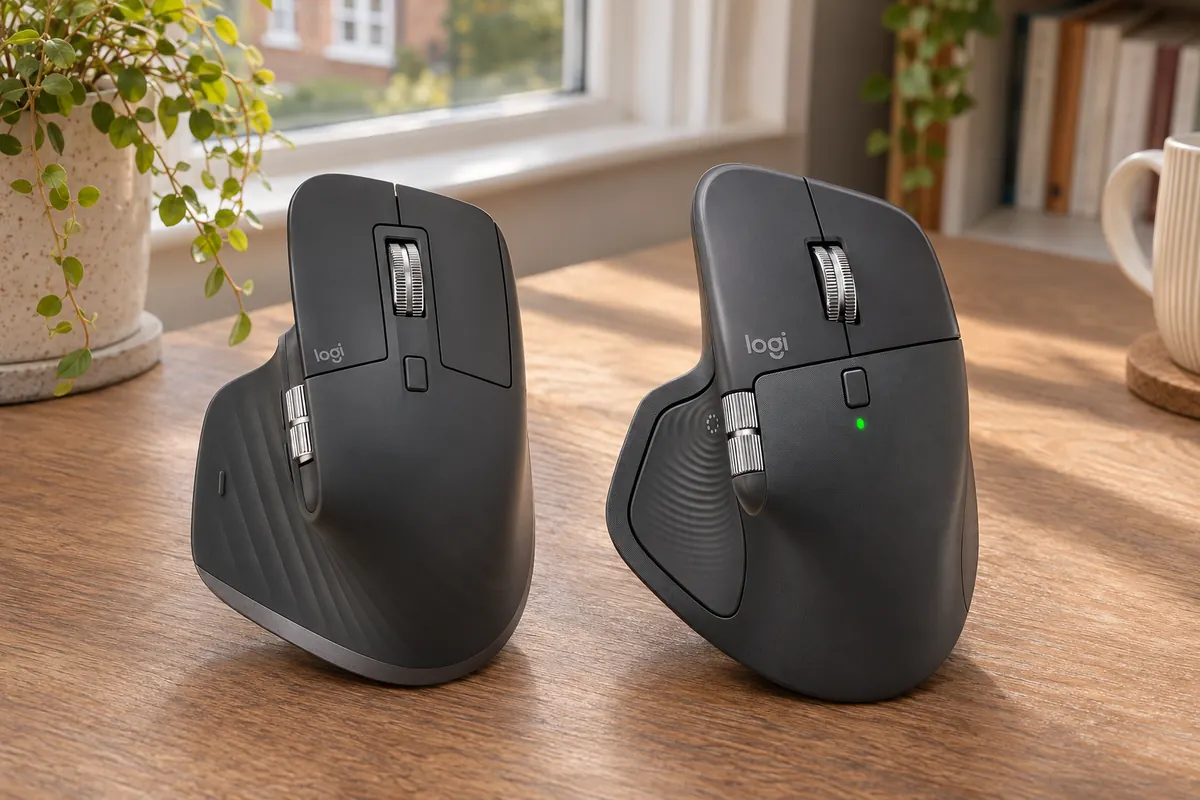
Our selected graphite products are MX Master 3S Bluetooth Edition 910-007501 and consumer MX Master 4 910-007562. Business, Mac-specific and other bundles are not interchangeable evidence. This model comparison builds on the computer mouse buying guide, with particular attention to edition changes that can alter the complete purchase.
What the current UK product pages actually list
| Detail to compare | 3S Bluetooth Edition | MX Master 4 |
|---|---|---|
| Exact part reference | 910-007501 | 910-007562 |
| Published mouse weight | 141 g | 150 g |
| Listed sensor range | 200–8,000 DPI | 200–8,000 DPI |
| Published button count | Seven, plus a listed gesture function | Eight, plus a listed gesture function |
| Contents in the checked box list | Mouse and user documentation | Mouse, USB-C Bolt receiver and user documentation |
| Main additional proposition | Existing 3S controls and optional customisation | Haptic feedback and Actions Ring workflow features, with software and system conditions |
The equal maximum sensor figure does not establish equal comfort, battery life or wireless behaviour. It also does not make either product the best gaming mouse. A high sensitivity ceiling is a specification, not a measured benefit for every spreadsheet or monitor arrangement.
Logitech’s published dimensions differ as well as weight: the 3S page gives 124.9 × 84.3 × 51 mm, and the Master 4 page gives 128.15 × 88.35 × 50.8 mm. Treat those as the manufacturer’s external measurements, not a prediction of how the thumb support or buttons fit your hand.
The Bluetooth Edition changes the box question
An older review or retailer listing for a differently referenced MX Master 3S may show an included receiver or cable. The current UK 910-007501 box list we checked contains the mouse and documentation. It does not list a Bolt receiver or charging cable. The selected Master 4 lists a USB-C Bolt receiver but also does not list a charging cable.
That distinction matters when buying for a computer without suitable Bluetooth or when you have only one type of USB port. Price a required compatible receiver or cable separately rather than assuming an accessory in an old photograph belongs to the present pack. Confirm the final retailer’s exact stock reference and contents before payment.
The 3S specifications say it is not compatible with the Logitech Unifying receiver system. A small receiver that happens to be available in a drawer is therefore not automatically a solution. Master 4’s page describes compatibility with USB-C and USB-A receivers, but that does not mean both are supplied in this consumer box.
Software permission comes before shortcut value
Logi Options+ provides the advanced customisation described on these pages. The Master 4’s haptic and Actions Ring proposition needs to be checked against the supported operating system, app version and particular application. Basic pointing support on a platform is not evidence that every advanced feature works there.
This is especially relevant on a managed work computer. Before choosing the more expensive mouse for a shortcut workflow, establish whether your organisation permits the required software and relevant plugins. Do not assume that administrative installation access or support for third-party integrations comes with the hardware purchase.
A workflow check before an upgrade
- Name three repeated tasks that the new controls would simplify.
- Check whether the required action already has a keyboard shortcut.
- Confirm Options+ support for the actual operating system and app.
- Ask whether the work computer permits installation and updates.
- Consider how the mouse behaves when used on a second, restricted computer.
Our guide to useful technology support and compatibility explains why an advertised capability should be tied to your setup. A shortcut that cannot run on the device you use is not a realised productivity benefit.
Read the time-saving claim with its study
Logitech promotes a time-saving result for Actions Ring. Its footnote identifies a 2025 Logitech Ergo Lab study involving 37 MX Master users and eight desktop actions, with results varying by assigned shortcuts. That is a defined manufacturer study, not evidence that every owner finishes an entire working day one-third faster.
We have not repeated that experiment or measured the two mice in a workplace. Judge the feature by whether the supported actions match a recurring task in your own applications. Avoid multiplying an advertised percentage by your salary or total computer hours to create a supposedly guaranteed repayment period.
Haptic feedback also needs a useful purpose. A tactile cue for a supported action may appeal to one workflow and be unnecessary in another. This comparison does not rank the feel or intensity of those cues through an independent handling test.
Shape, weight and hand use are separate choices
These are sculpted right-hand mice. If that basic format does not suit your hand or preferred grip, choosing between generations will not solve the mismatch. Start with reach to the thumb wheel and buttons, wrist position and the space available beside the keyboard.
The listed nine-gram difference should not become an unsupported comfort verdict. Balance, friction, desk surface and how the user moves the device all matter. Our mouse grip and size guide gives a way to record those fit questions without claiming a product prevents or treats pain.
Both product descriptions discuss tracking on glass with a minimum glass thickness condition of 4 mm. That qualification is worth keeping with the claim. It is not a promise of perfect performance on every transparent, reflective or uneven desktop, and this article includes no independent surface test.
Connections and charging need the whole desk
List the ports and wireless options on each computer you intend to use. Include any dock or hub between a receiver and the machine, and account for the socket occupied during charging. A suitable connector shape alone does not establish the required data or power function.
Keep the pairing, receiver and charging questions separate. The existence of a USB-C charging socket should not be described as proof of a wired pointing mode. Follow Logitech’s documentation for the actual connection route and verify any accessory before buying it.
For the longer term, our mouse switch, battery and feet care guide helps organise faults and maintenance. A new product’s battery claim does not establish the condition of a used 3S, while a rechargeable design still needs an ownership and end-of-life plan.
Calculate the premium after required accessories
The checked UK pages displayed £76.49 against £89.99 for the graphite 3S Bluetooth Edition and £119.99 for graphite Master 4. Both displayed an in-stock shipping message. The headline difference was £43.50 before any final basket or accessory adjustment, and we did not place an order.
If the cheaper edition needs an extra compatible receiver for your setup, add its current price. If Bluetooth already works and the cable is already available, do not invent an accessory cost to make the premium seem smaller. Likewise, a retailer’s gift or code needs its actual eligibility checked before it is counted as a saving.
A working 3S creates a different upgrade calculation from a new purchase. The relevant outlay is the replacement cost minus any genuinely realised resale value, not simply the gap between two new-price labels. Preserve the current setup if the new features do not solve a specific limitation.
Our Currys versus John Lewis electricals comparison helps examine seller support once the product reference is fixed. The online purchase evidence guide explains what to retain when a pack description or included accessory determines your choice.
Two mouse purchase paths
Choose the 3S edition around a complete basic setup
Bluetooth and the existing controls meet the brief, the sculpted form is suitable and the actual pack needs no expensive additions. Keep the exact edition visible when comparing retailer quotes.
Choose Master 4 around supported extra functions
The haptics or Actions Ring address identified tasks, the required software is permitted and the included USB-C receiver fits your route. Assess handling and the full premium separately.
Our balanced conclusion is that Master 4 has a clearer case for a compatible, feature-led new purchase than for replacing every working 3S. The current cheaper edition remains a serious option, provided its leaner box and platform requirements are understood.
Logitech UK consumer editions
MX Master 3S Bluetooth Edition 910-007501 specifications and box listGraphite MX Master 4 910-007562, software conditions and study footnote
Edition and upgrade questions
Does every MX Master 3S come with a receiver?
The checked UK Bluetooth Edition 910-007501 lists only the mouse and documentation. Other packs need their own contents check.
Are both USB receiver types included with Master 4?
The selected consumer box lists a USB-C Bolt receiver. Compatibility with another receiver type does not establish that it is also supplied.
Will Actions Ring work on a locked-down work laptop?
Check the actual operating system, Options+ requirements and your organisation’s installation policy before paying for that workflow.
Does the 8,000 DPI figure mean Master 4 is more precise than 3S?
Both pages list the same maximum sensor sensitivity. This article supplies no independent accuracy or latency measurement.
Is the advertised time saving guaranteed across my whole day?
The manufacturer footnote relates to a particular study and selected actions. It should not be generalised into a universal working-time reduction.
How the current mouse editions were compared
On 22 November 2026 we opened the UK graphite product pages and their specification and box-content panels, recorded the current prices and separated platform support from advanced software functions.
Assessment boundaries
No handling, battery endurance, wireless latency, sensor accuracy or productivity trial was conducted. Software support, bundles and offers can change, and neither the published weight nor a marketing claim establishes personal comfort.