Mechanical keyboard layouts guide: 60%, TKL, full-size and desk fit
A smaller keyboard creates mouse space by moving or removing keys; it does not remove the underlying commands. Choose a layout by the keys, layers and desk geometry your real workflow uses.
In this guide
Map one working week before choosing a percentage
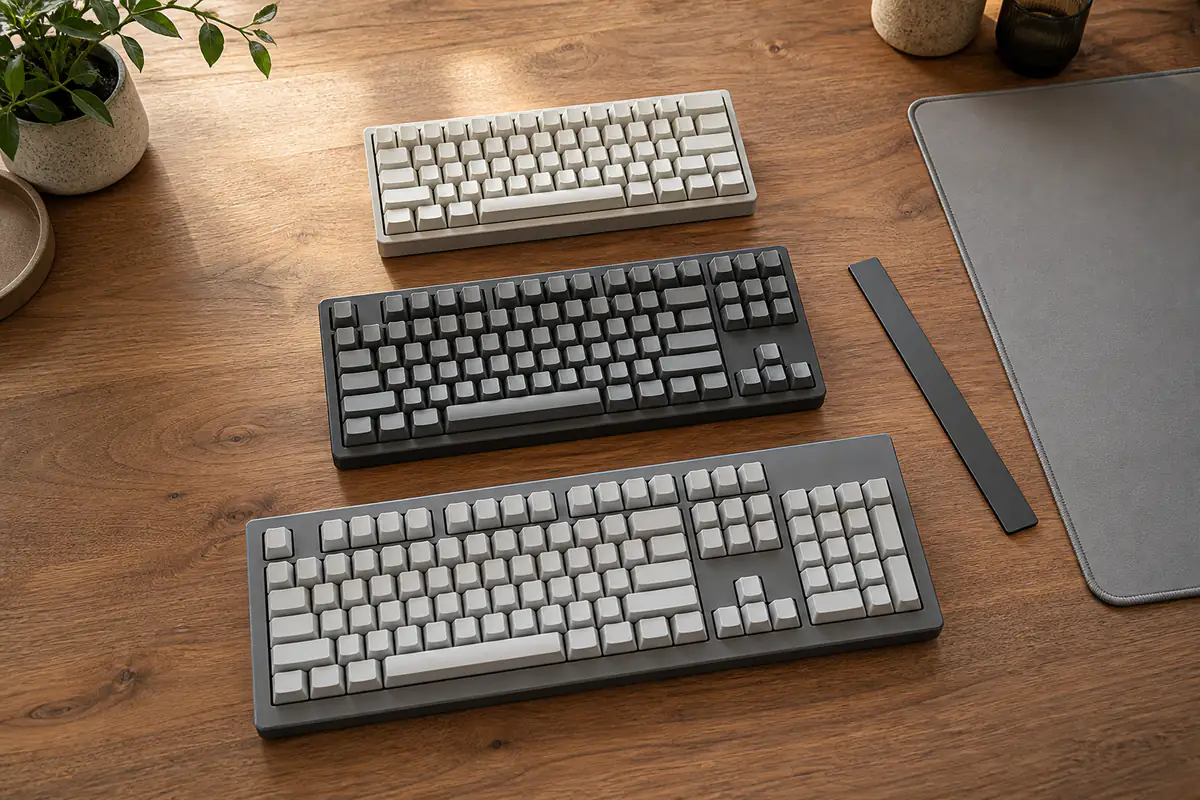
Full-size preserves direct access; TKL removes the number pad; compact layouts trade more keys for layers and mouse room. Check exact physical layout, regional key arrangement, navigation cluster, firmware, remapping, accessories and desk fit rather than buying by percentage name alone.
This narrow layout guide complements the mechanical-keyboard buying guide. Compare desk input with the mouse guide, and check retailer variants using the model-code guide.
| Layout | Keeps directly | Moves or removes | Best evidence |
|---|---|---|---|
| Full-size | Function row, navigation and number pad | Little or nothing | Desk width and number entry |
| TKL | Function row and navigation | Number pad | Mouse space versus numeric work |
| 75% | Most laptop-like functions | Spacing and some dedicated keys | Exact key map and spacing |
| 60–65% | Core typing block; often arrows at 65% | Function and navigation layers | Layer diagram and remapping |
Layout audit before purchase
- Keys used during one working week.
- Shortcuts requiring simultaneous presses.
- Regional ISO or ANSI arrangement.
- Desk width and preferred mouse position.
- Need for number pad and navigation cluster.
- Layer labels and onboard memory.
- Remapping software and operating systems.
- Separate keypad and wrist-rest cost.
Ignore the percentage until the key map is visible
Percentage labels are approximate families, not complete standards. Two 75% boards can place navigation keys, delete, arrows and modifiers differently.
Use the exact top-down diagram and model code. Product photographs with decorative keycaps can hide the keys that matter.
Record real key use
For several days note number-pad entry, function keys, arrows, home, end, page keys, delete, print screen and application shortcuts. Include gaming, accessibility and remote-desktop commands.
Frequency is not the only issue: an infrequent recovery or work command can still deserve direct access if layer use is unreliable under pressure.
Measure the desk as a two-hand system
Record desk width, keyboard position, shoulder line, mouse travel and space for documents or a tablet. A narrower board can reduce right-arm reach for right-handed mouse use.
Do not claim an ergonomic cure from width alone. Chair, desk height, technique, breaks and individual needs still matter; seek professional advice for pain.
Understand full-size value
Full-size provides number pad, navigation cluster and function row without layers. It can suit frequent data entry, specialist shortcuts and shared desks where conventions reduce learning.
The trade-off is width and fixed number-pad position. A separate keypad can place numeric entry on either side, but adds cost, cable or battery and another device to store.
Understand tenkeyless
TKL generally removes the number pad while retaining function and navigation clusters. It often gives the simplest reduction in width without changing common editing keys.
Check the exact gap and placement around arrows and navigation. Compact TKL variations may compress spacing even when the same named keys remain.
Understand 75% and 65% layouts
A 75% layout usually keeps a function row and arrows in a compressed block. A 65% layout usually keeps arrows while moving more navigation commands to a layer or side column.
Spacing affects touch orientation. A key being present does not guarantee it can be located quickly without looking, especially during shortcut combinations.
Understand 60% layouts
A 60% board typically removes the dedicated function row, navigation cluster and often arrows, exposing them through a function layer. It can maximise mouse room and portability.
The buyer must learn the exact layer and confirm commands pass correctly through games, virtual machines and remote sessions. Compactness is not free; it converts hardware space into cognitive work.
Check ISO, ANSI and regional legends
Enter shape, left shift, backslash and surrounding keys differ between common physical arrangements. UK legends and symbol positions also matter for established typing habits.
Operating-system language cannot change physical key shape. Verify exact sold variant, not a review sample or marketing render from another region.
Audit layers and simultaneous shortcuts
Read the default layer map and test whether required commands need awkward chords or conflict with application shortcuts. Look for layer indicators and a predictable route back to the base layer.
A printed secondary legend can help, but blank or side-printed keys may be hard in low light. Do not assume software can repair every physical omission.
Check remapping and onboard memory
Confirm which keys and layers can be remapped, whether macros are supported, and whether settings live on the keyboard or only in software. Workplace devices may block utilities.
Use the manual-before-buying guide. Cloud accounts, unsigned tools or unsupported operating systems reduce practical value.
Separate layout from switch choice
Key feel, force, sound and switch serviceability are separate from layout. A perfect layout with unsuitable switches remains a poor keyboard.
The complete keyboard guide covers switches, noise and wireless modes. Keep those decisions in separate shortlist columns.
Check stabilisers, keycap compatibility and unusual sizes
Compact boards may use non-standard right shifts, spacebars or bottom rows. That affects replacement keycap availability even when switch stems are common.
Save a unit diagram and key sizes. A generic “compatible set” may not cover every stabilised or shortened key.
Price the complete layout solution
Add a separate keypad, wrist rest, cable, adapter, replacement caps or carrying case only when genuinely needed. A cheap compact board can cost more when it must be rebuilt into a full workflow.
Use the basket comparison method and align exact regional model codes, included accessories and warranty.
Test during the return window
Run normal typing, spreadsheet work, navigation, shortcuts, games and sleep or wake behaviour. Keep packaging and do not modify switches or firmware irreversibly until the layout is accepted.
Record missing commands and repeated errors. A short novelty adjustment is normal, but the buyer should not rationalise a layout that blocks essential work.
Plan for shared and accessible use
A compact custom layer can be efficient for one owner yet confusing for a shared household or workplace. Consider visible legends, predictable keys and the ability to restore defaults.
Accessibility requirements can make direct keys, larger spacing or specialist hardware essential. Do not remove necessary controls merely to achieve a cleaner desk.
Choose the smallest layout with no harmful omission
Start at full-size and remove the number pad only if use evidence permits; then consider compression and layers. This makes compactness an earned benefit.
The ideal layout preserves every important command at acceptable effort and leaves enough room for the mouse and posture, without buying unused keys for convention alone.
Print or sketch the exact key map at real size and place it on the desk before ordering. Run through a spreadsheet, text-editing session, screenshot command, media control, game and recovery shortcut using the proposed layers. A paper rehearsal cannot judge switches, but it exposes missing positions before price and aesthetics dominate.
For laptops and hot desks, decide whether muscle memory must move between layouts daily. A compact board that relocates delete, arrows or function commands can increase errors when the other device remains conventional. Consistency may be worth more than the last few centimetres of saved width.
Also verify how the keyboard behaves before its software loads: login screens, firmware setup, encrypted startup and troubleshooting may require direct keys or documented layer commands. A remap stored only in a desktop application may disappear precisely when a recovery key is needed.
After arrival, keep a seven-day error log rather than judging novelty on the first evening. Note commands searched for, accidental layer activations, mouse reach and number-entry workarounds. Accept learning that improves steadily; reject a layout that repeatedly blocks essential tasks or shared users.
Check cable exit and wireless switch placement at the same time. A narrow case can still consume awkward space when a rigid connector points towards the mouse mat, and a hidden power switch may require lifting the board each day. Layout value includes the occupied working envelope, not only case width.
TKL or compact 60–65%?
Direct navigation and function keys matter
You want more mouse space but do not want core editing commands hidden on layers.
Space and portability lead
The exact layer map, remapping and missing-key workflow have been tested and accepted.
Balanced verdict
Keyboard layout is a workflow map, not a style percentage. Record key use, measure the two-hand desk, verify regional geometry and layers, then choose the smallest board that preserves essential commands.
The linked keyboard, mouse and model-code guides cover the remaining hardware decision.
Official checks:
GOV.UK product safety advice ↗
GOV.UK product recalls and alerts ↗
NCSC security guidance ↗
HSE display screen equipment guidance ↗
Frequently asked questions
What is a TKL keyboard?
Tenkeyless generally keeps function and navigation clusters but removes the number pad; verify the exact map.
Does a 60% keyboard have arrow keys?
Often arrows are on a function layer rather than dedicated keys. Some variants differ, so check the exact diagram.
Is a smaller keyboard more ergonomic?
It can reduce mouse reach, but comfort also depends on desk, chair, technique and individual needs.
Can software remapping replace missing keys?
Sometimes, but operating-system support, workplace restrictions, onboard memory and shortcut conflicts can limit it.
Should I buy a separate number pad?
Only when numeric work needs it and flexible placement justifies the extra cost, device and desk space.
Methodology and limitations
We compared mechanical keyboard layouts through exact key maps, weekly key use, desk geometry, number entry, navigation, layers, regional arrangements, remapping, keycap compatibility, total cost, shared use and return testing. Official UK safety, cyber and workstation guidance was reviewed on 1 September 2026. We did not benchmark a named keyboard.
Limitations
Percentage labels and firmware vary between models, while comfort and shortcuts are personal. Verify the exact UK variant, manual and supported software; seek appropriate ergonomic advice for symptoms.